




Show/Hide Position on airport diagrams and approach plates
AvPlan 2.0 can show your position on airport diagrams and approach plates. You can individually enable and disable the Aircraft […]
Learn More



AvPlan 2.0 can show your position on airport diagrams and approach plates. You can individually enable and disable the Aircraft […]
Learn More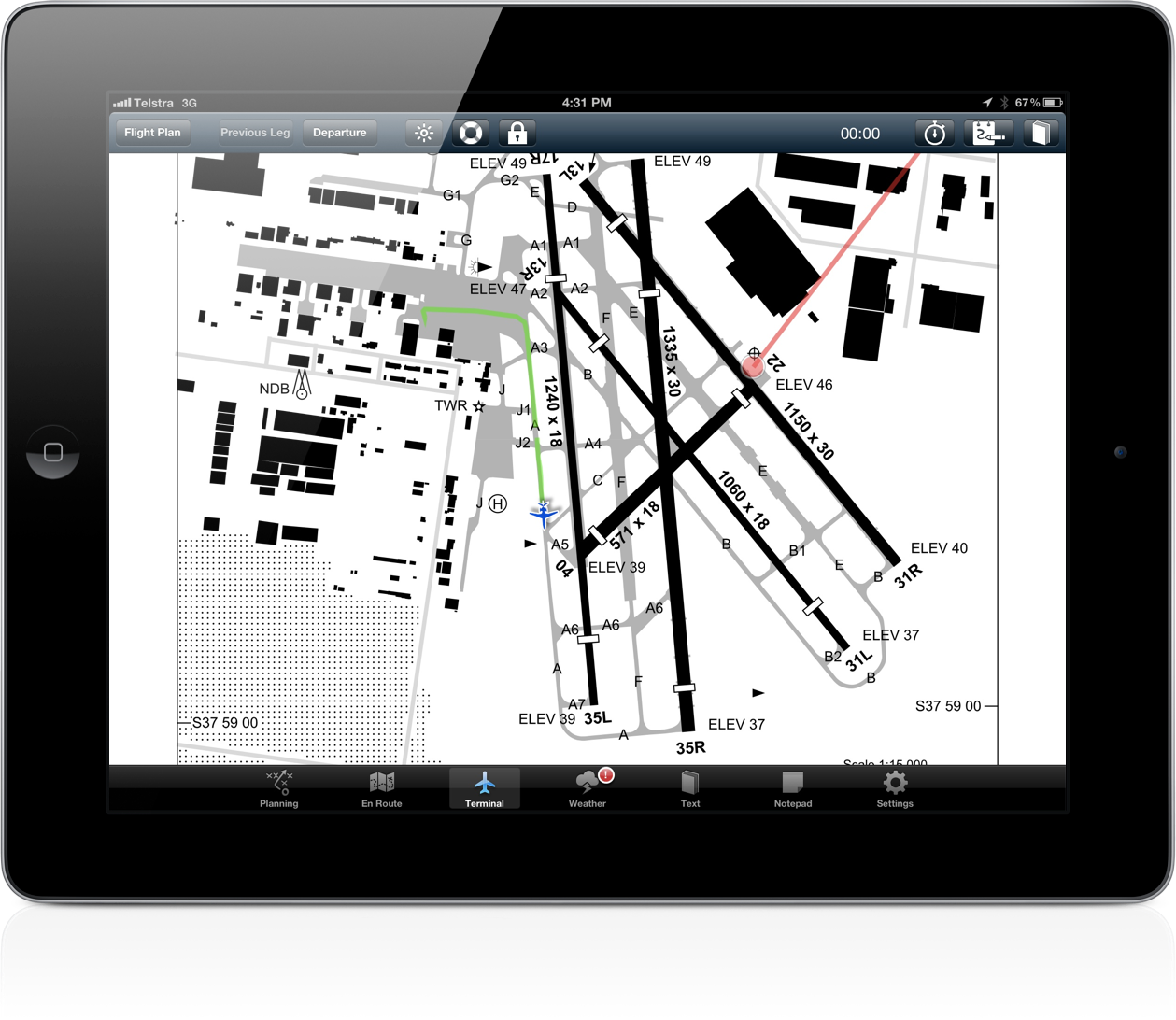
AvPlan 2.0 introduces a major new first for an Australian made EFB – geo-referenced airport taxi diagrams which show your […]
Learn More
Today AvPlan turns 1! A year ago we launched AvPlan and it has proved far more popular than we ever […]
Learn More After much debate with Apple, we are extremely excited to announce that AvPlan 2.0 is now available in the App […]
Learn More
The current legal situation with using AvPlan as an EFB in flight is somewhat unclear. CAR 233 specifies that the […]
Learn More
When adding an aircraft, the various avionics may be specified by tapping on ‘Avionics’. If you require to use ‘Z […]
Learn More
At AvPlan we intend to support as many devices and operating system versions as possible, however we must be sensible […]
Learn More
To add a flight plan leg to an alternate aerodrome, tap the ‘+’ at the top of the flight plan. […]
Learn More
Well we have been sitting in the queue at Apple now for over 11 days now. Usually our updates get […]
Learn More
AvPlan automatically saves all downloaded weather information – it does this unobtrusively in the background as and when required. When […]
Learn More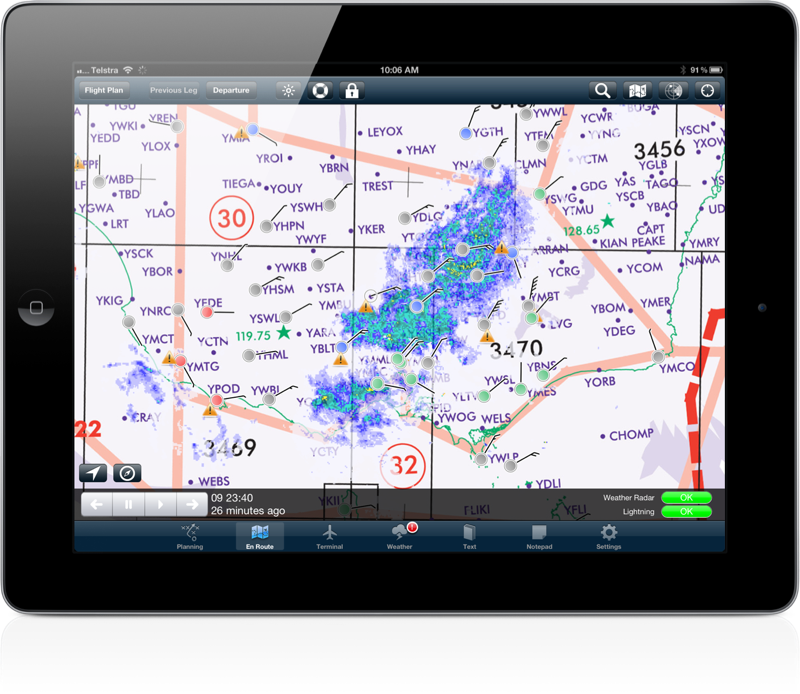
Weather is constantly changing, and as a pilot a complete understanding of changing conditions is extremely important. That is why […]
Learn More
The red (!) on the icon for the Weather pane indicates there is a SIGMET in the current forecast. […]
Learn More
AvPlan 2.0 has a nifty feature built in that detects when you land, then automatically switches the terminal pane to […]
Learn More
With the release of AvPlan 2.0 we will be streamlining the subscription model. Almost all the current subscribers at least […]
Learn More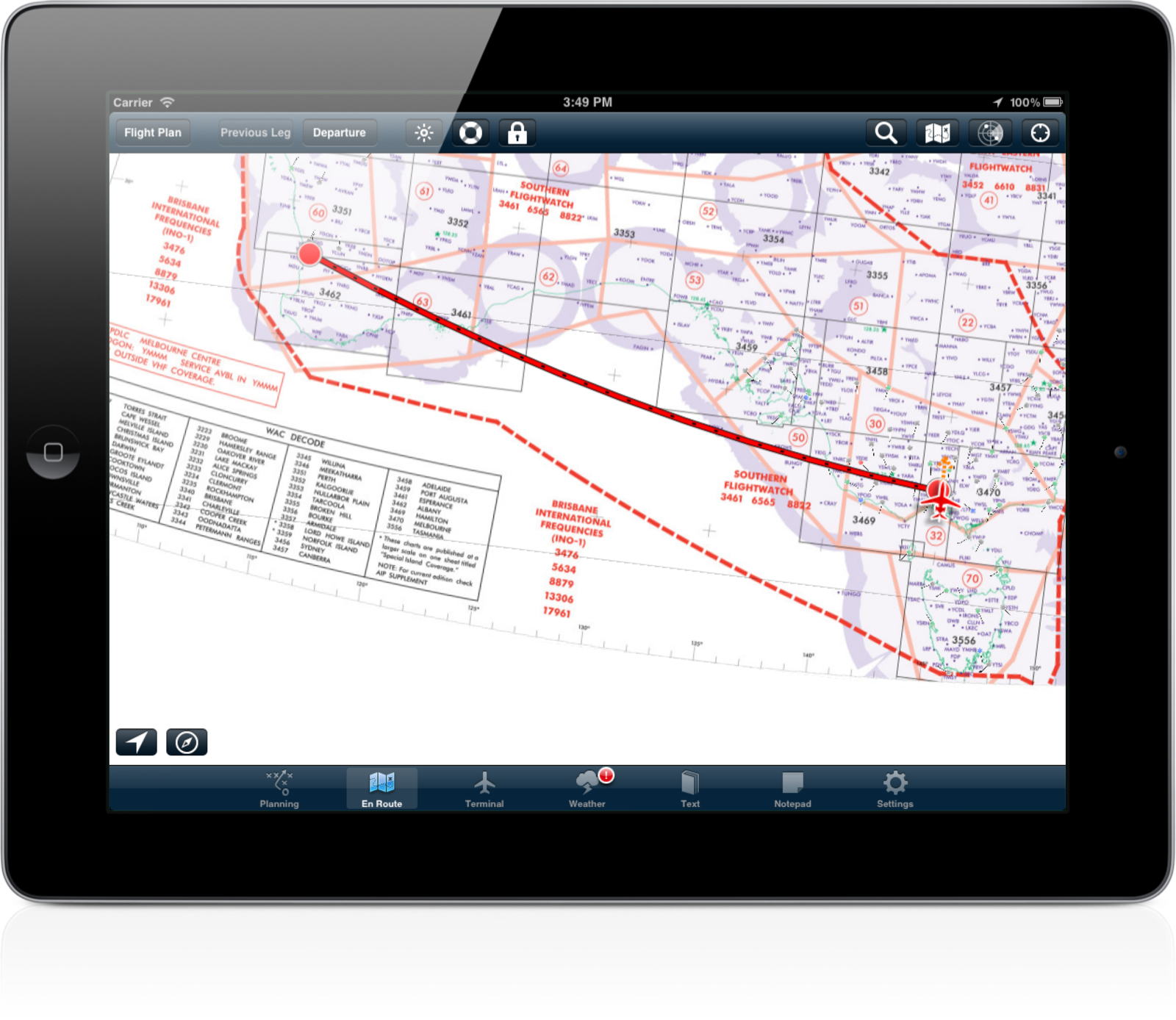
AvPlan 2.0 draws all routes as correct great circle tracks. The previous method worked for legs which were relatively short, […]
Learn More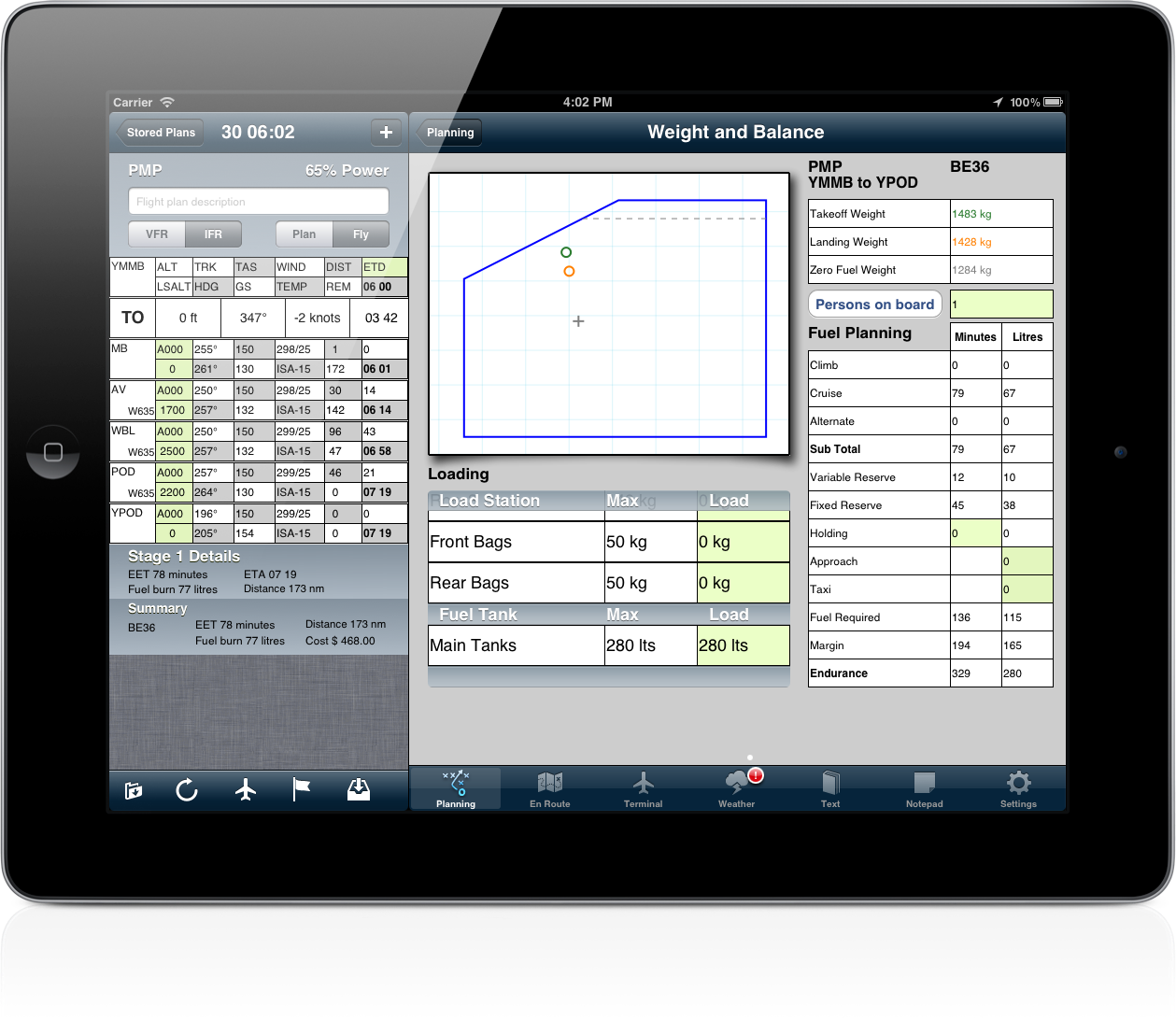
We have given the weight and balance screen an overhaul in AvPlan 2.0. We have Added grid lines on the […]
Learn More
AvPlan includes the ability to add a fix to a map, just like drawing a circle around your current position […]
Learn More
AvPlan 2.0 adds AIP SUP pages to the list of available items under the Text pane. Support has also been […]
Learn More
One method of adding a track point to your plan is tapping the ‘+’ at the top right hand side […]
Learn More
AvPlan 2.0 includes a built-in terrain warning system. These alerts are based on the FAA TAWS-B standard, and when triggered, […]
Learn More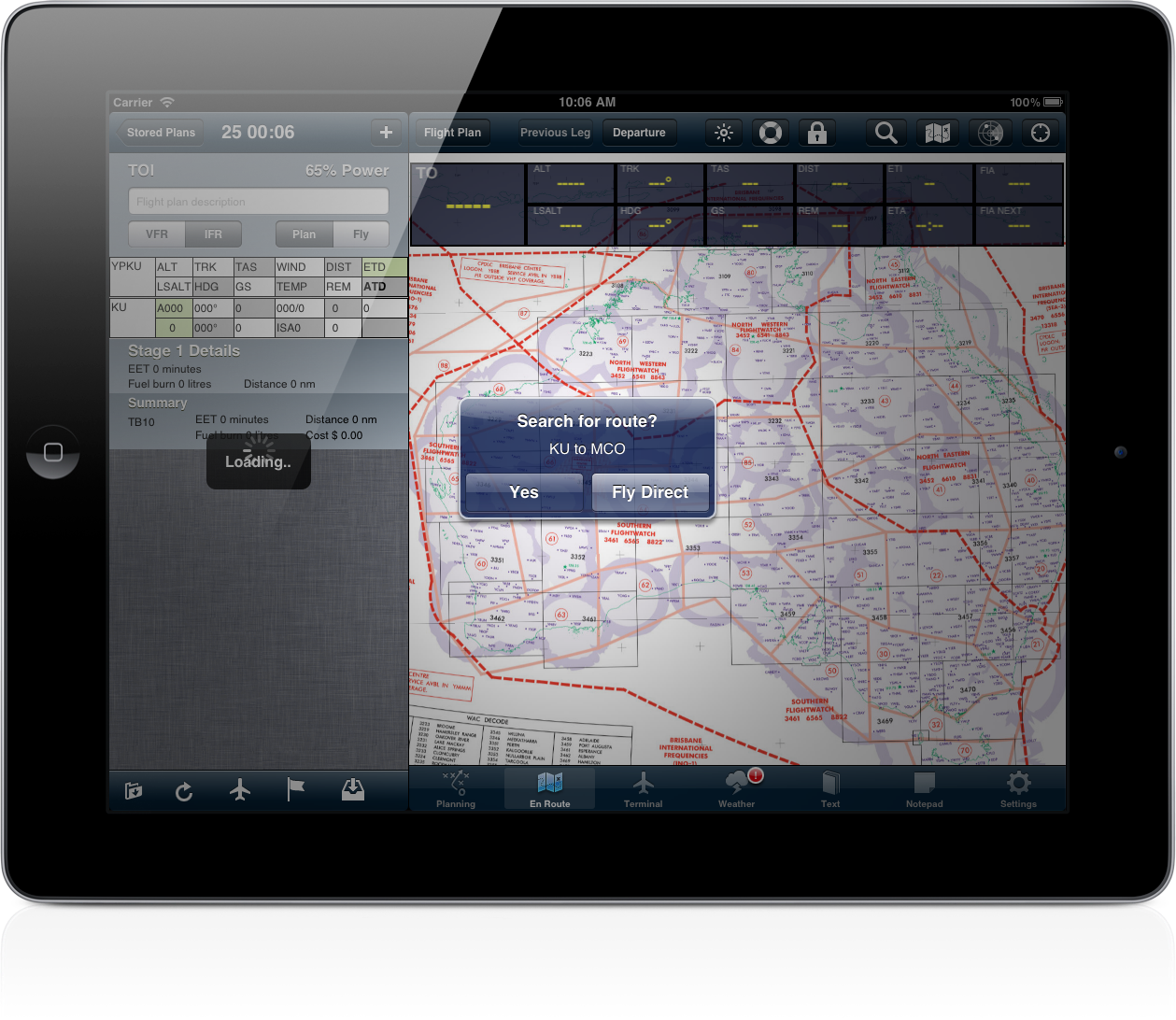
AvPlan 2.0 incorporates a unique ability to find the shortest IFR route between any two points in its database if […]
Learn More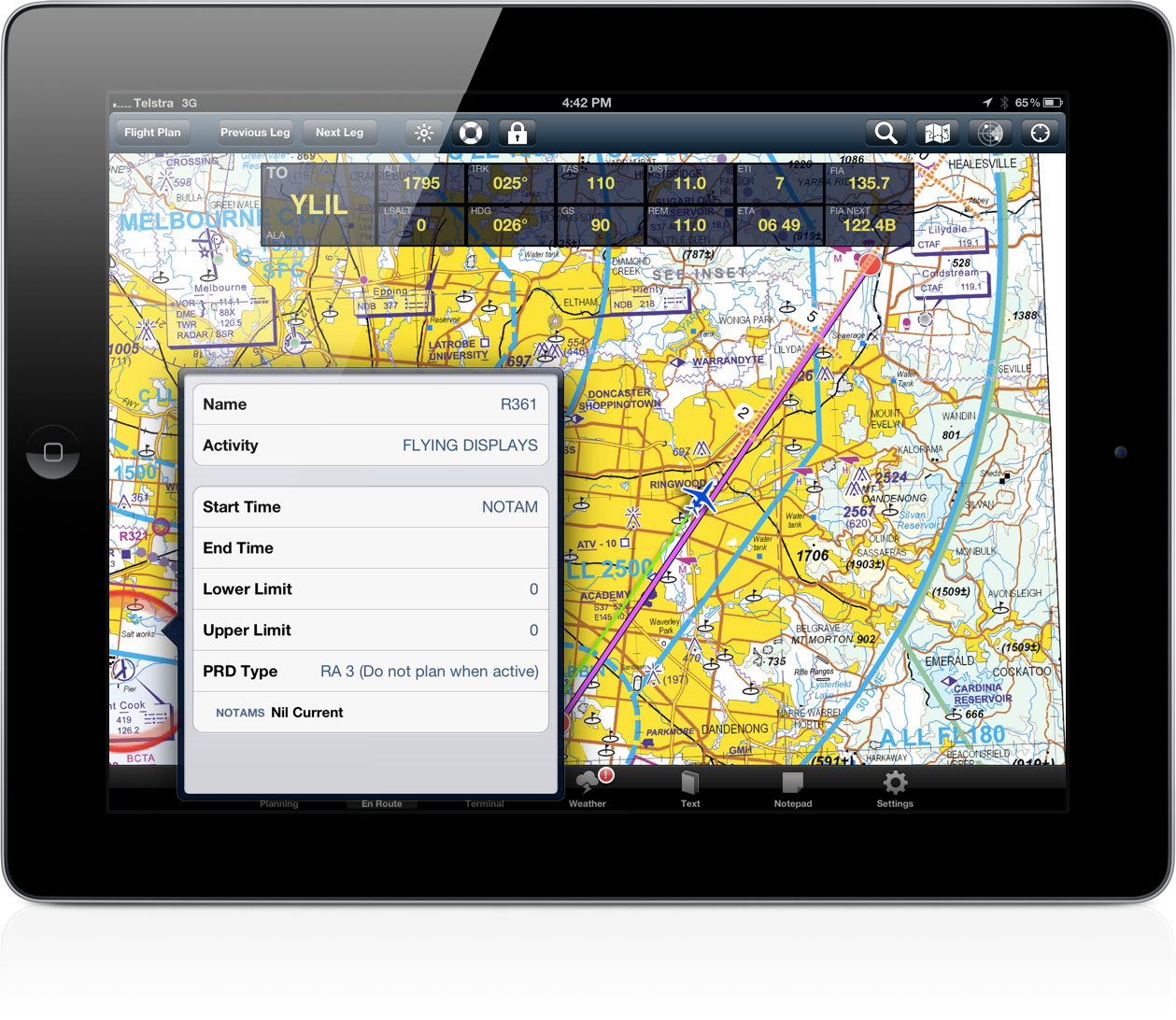
AvPlan 2.0 includes the ability to double tap on a map to view the status of a restricted area. The […]
Learn More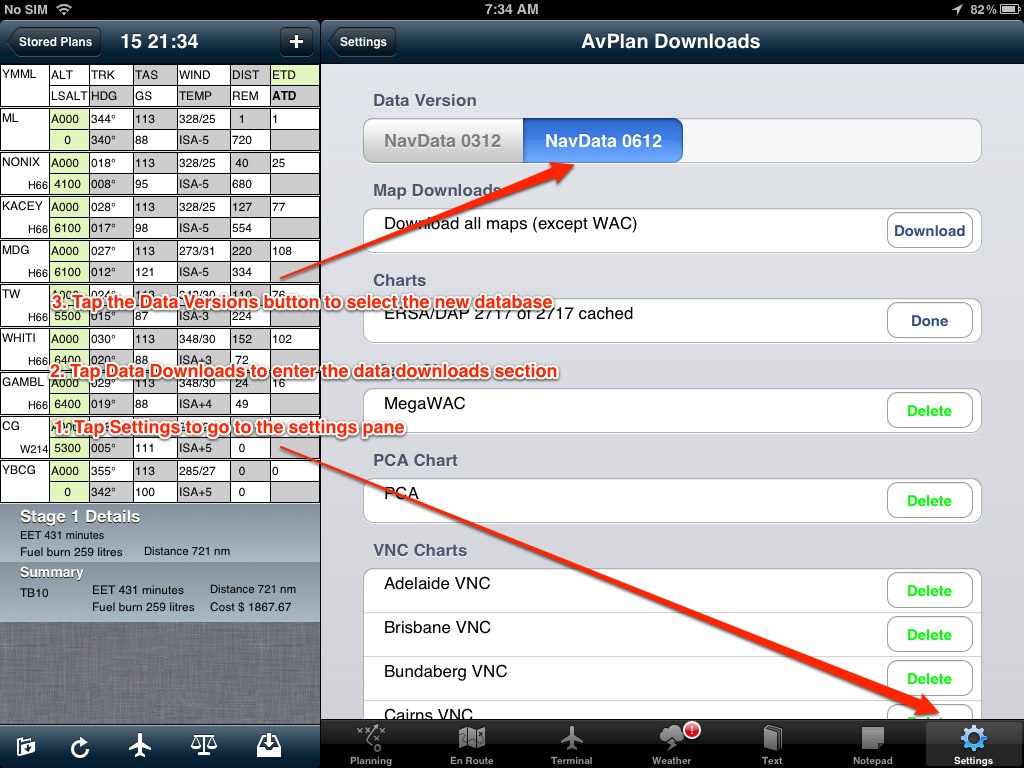
The June data update, which is valid from 28 June 2012 is now available for download. The app will prompt […]
Learn More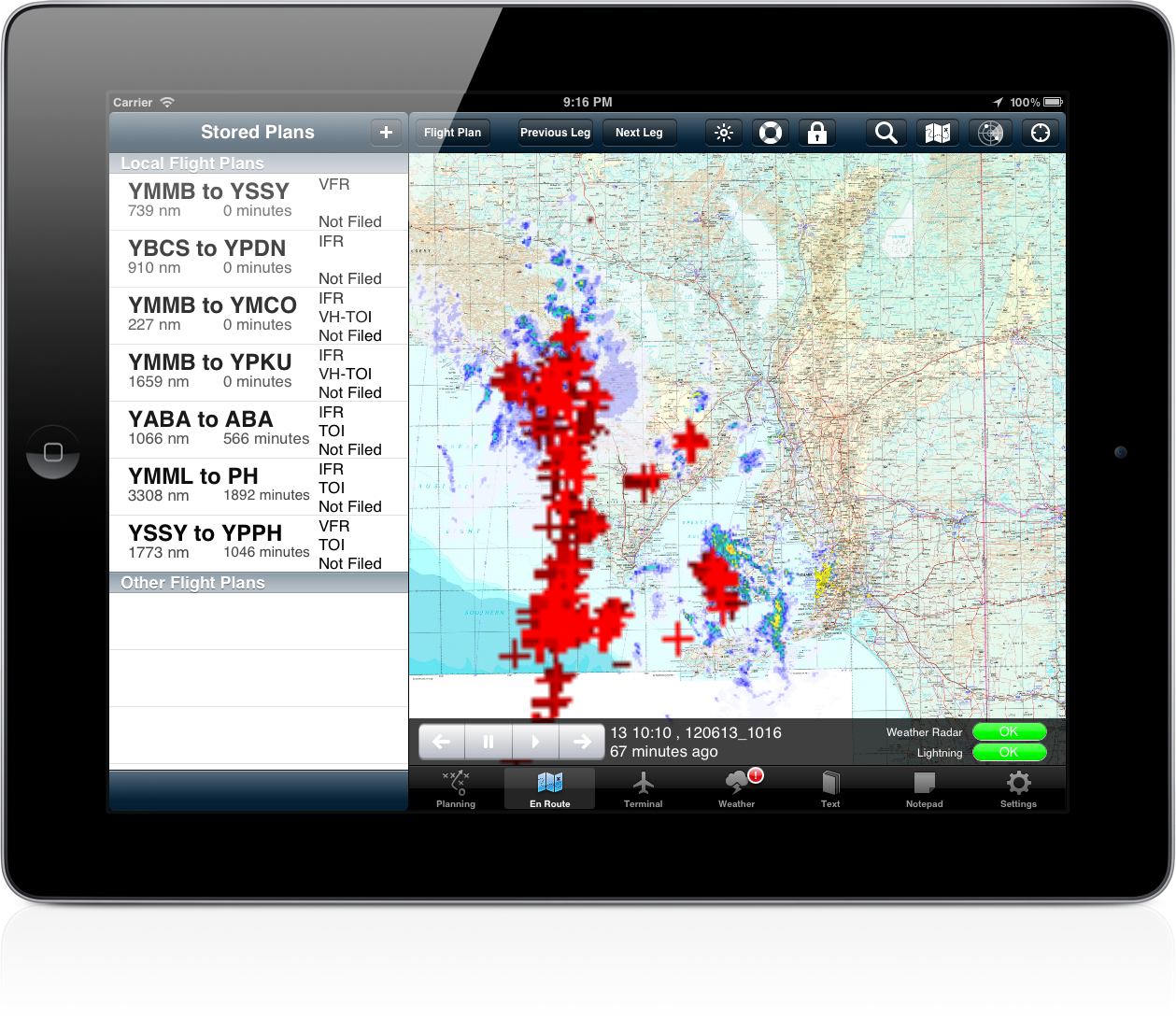
AvPlan 2.0 includes a completely revamped weather overlay system. The BOM radar can be overlaid all map types (not just […]
Learn More
In some cases it can be necessary to delete a single ERSA or DAP page and have it re-download (if […]
Learn More
When a flight plan has been submitted using NOSEND, and then the same plan needs to be sent with a […]
Learn More
We are happy to announce that AvPlan 1.7.3 is now available in the App Store. In this release we have […]
Learn More
We have put a lot of effort to allow you to import existing flight plans into, and export flight plans […]
Learn More
Moving map mode is enabled at any time when no flight plan is active. Tapping the map will bring up […]
Learn More
At times you will notice the stored plans have different colours Black – all is in sync Blue – currently […]
Learn More
If you like the app, when a new update appears in the App Store, go and rate the new version. […]
Learn More
To extend your battery life when flight planning, disable the moving map (which will turn off the GPS). Tap ‘Settings’, […]
Learn More
In moving map mode, tapping the data labels that overlay the map will cancel direct-to navigation.
Learn More
We will be presenting AvPlan to the Southport Flying Club on Saturday 12th of May 2012 at 10am. We will […]
Learn More
AvPlan 1.7.1 is now available in the App Store. This release mainly features bug fixes to improve performance and stability.
Learn More
An old stored flight plan can be deleted by swiping the row. Tap the delete button which appears and the […]
Learn More
An active SARTIME can be cancelled directly by AvPlan. Firstly, submit a flight plan or SARTIME notification with AvPlan. At […]
Learn More
To enable track up mode on the map, tap the map settings button and tap ‘Map Rotation’. With ‘track up’ […]
Learn More
AvPlan 1.7 is now available in the App Store. In this release we have added the following new features; SARTIME […]
Learn More
AvSoft Cloud Services enable flight plans and aircraft details to be backed up and synchronised automatically across your various devices. […]
Learn More
AvPlan includes a terrain database which covers all of Australia at a resolution of approximately 1km square. A view of […]
Learn More
Since version 1.6.1, AvPlan has included an interface to enable it to connect to X-Plane. Tap ‘Settings’, ‘User Settings’ and […]
Learn More
Full text search is available for all documents in the ‘Text’ pane in the app. To search for a term; […]
Learn More
Tips AvPlan can email complete aircraft models, which can be imported by other users on their devices. Tap ‘Settings’, ‘Aircraft Type […]
Learn More
AvPlan now includes the ability to search for a location. Tap the En Route pane to go to a map, […]
Learn More
AvPlan 1.6.2 is now available from the App Store. This release adds; Users can exchange aircraft models via email. Maps […]
Learn More
The table of contents for the AIP is available in AvPlan 1.6.1. Tap ‘Text’ and open a section of the […]
Learn More
After a long wait, and a bit of debate with the folks in App Review, we are pleased to announce […]
Learn More
To load the AvPlan user manual into iBooks, on your iPad/iPhone, open Safari and open the user manual located at […]
Learn More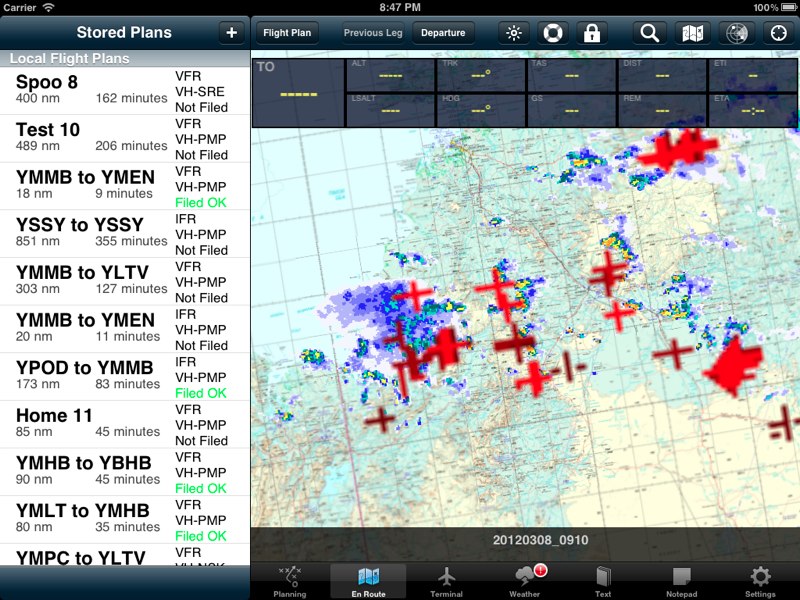
We’re working on yet more innovative ways to display weather information to assist with preflight planning and inflight situation awareness. […]
Learn More
The aircraft icon changes colour depending on the state of the GPS signal; Black when location information is unavailable, or […]
Learn More
To delete an unwanted performance profile, tap the aircraft icon under the flight plan, and then the aircraft. Swipe the […]
Learn More
By default, AvPlan will use the last aircraft and flight rules used to create a new flight plan.
Learn More
AvPlan will interpret and display current SIGMET’s as large orange areas on the map. To enable the SIGMET display, on […]
Learn More
Additional fields in a NAIPS plan submission can be entered as follows; DLA/ – tap on the desired leg of […]
Learn More
With ‘Centre on location’ set on the map, you will find you cannot scroll around (zooming will still work). To […]
Learn More
To download an aircraft model from the type database, Go to Settings, Aircraft Type Database in the app on your […]
Learn More
Your iPad and iPhone will shut down if they get too hot. To ensure that your device remains available, do […]
Learn More
If you enter an email address and password into AvPlan (Tap Settings, User Details), the app will automatically backup your […]
Learn More
To print or send a blank plan form, tap ‘Planning’ and then ‘Print/Send’. With only ‘blank plan’ selected a blank […]
Learn More
On the En Route tab, the course prediction line shows the anticipated location in 2, 5 and 10 minutes based […]
Learn More
AvPlan can show you your current leg information shown as data fields over the En Route pane. Tap the ‘Map […]
Learn More
A user lowest safe altitude can be entered for any leg in a flight plan. After calculating the correct altitude, […]
Learn More
When you tap the radar button on the En Route tab, the radar overlay is activated. A text bar appears […]
Learn More
These days there are many IACO approved type designators – but occasionally you may need to submit a plan for […]
Learn More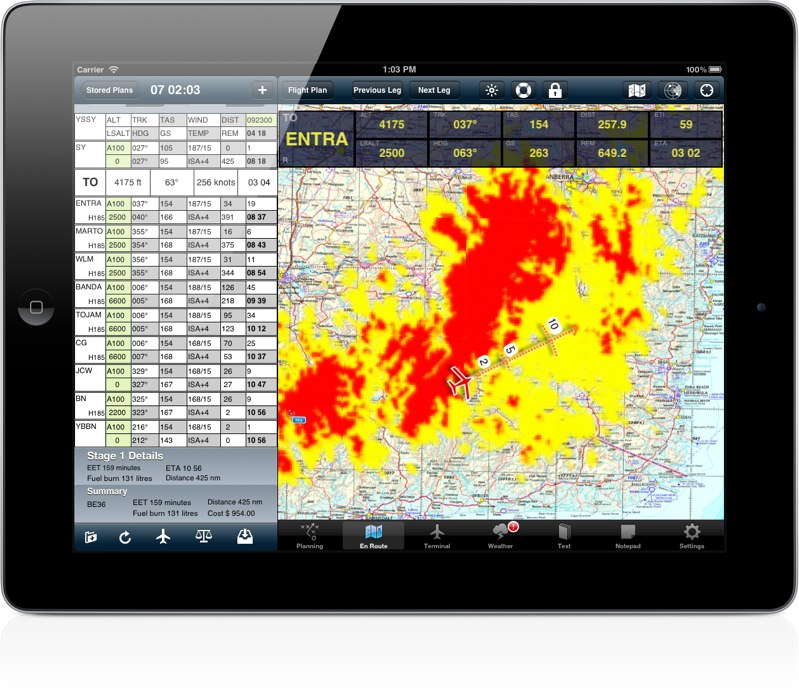
Coming soon to AvPlan will be a terrain overlay on all Airservices maps. This overlay will show areas of terrain […]
Learn More
To quickly locate ERSA information for a point on the map, tap the map on/near the point to bring up […]
Learn More
When away from internet access, it may be necessary to manually add winds to a plan. Do do this place […]
Learn More
By default, AvPlan saves all forecasts – to delete forecasts older than 7 days, go to the weather pane, tap […]
Learn More
AvPlan users have the option to disable automatic weather downloads as a flight plan is created. Open the ‘Settings’ app, […]
Learn More
Tap (and hold if in fly mode) on the En Route page will bring up the ‘Select Nearest’ window. The […]
Learn More
The red exclamation mark on the Weather tab indicates a SIGMET is active in the current forecast. This can be […]
Learn More
To access an approach plate for a leg in your flight plan, tap on the row of the plan. The […]
Learn More
To copy an aircraft type, tap ‘Settings’ then ‘Aircraft Type Database’. Tap ‘Edit’ and select the aircraft type to be […]
Learn More
To track direct to a leg in your current plan, tap and hold on that leg in the flight plan. […]
Learn More
At times of bad network connectivity, downloading weather forecasts can be slow. To cancel a weather forecast download in progress, […]
Learn More
To clear all details from a flight plan so it can be reused, tap the edit button on the bottom […]
Learn More
To resume tracking via your flight plan after flying in ‘Direct To’ mode, tap and hold on the appropriate leg […]
Learn More
To track direct to a point which is not in your plan, tap and hold the map near the location […]
Learn More
AvPlan will overlay METAR’s on the maps and colour code them depending on the actual conditions. Tap the map […]
Learn More
When flying at night, fully dim the iPad using the iPads brightness control and then further adjust it with the […]
Learn More
To move a flight plan leg, tap and hold on the waypoint on the map until the blue ring appears […]
Learn More
To quickly delete a flight plan leg, tap and hold on a the leg to be deleted. From the menu […]
Learn More
Often it is necessary to insert a point on a map into a leg of a plan. For example, to […]
Learn More
We are extremely excited to announce that AvPlan 1.6 is now available. This is the first version to support the […]
Learn More
Welcome to the AvPlan tip of the day! Check back here each day, or subscribe to our tips via email […]
Learn More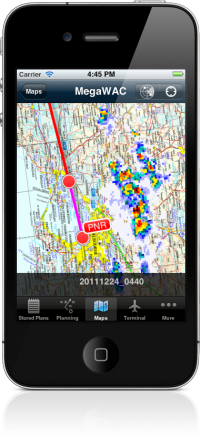
We hope you all had a very merry Christmas and have a happy and successful 2012. We have been busy […]
Learn More
AvPlan 1.5.4 is now available via the Apple App Store. This release includes the following new features; Direct to navigation […]
Learn More
Hi Folks We are slowing down as the holiday season approaches, and putting the final touches on what will be […]
Learn More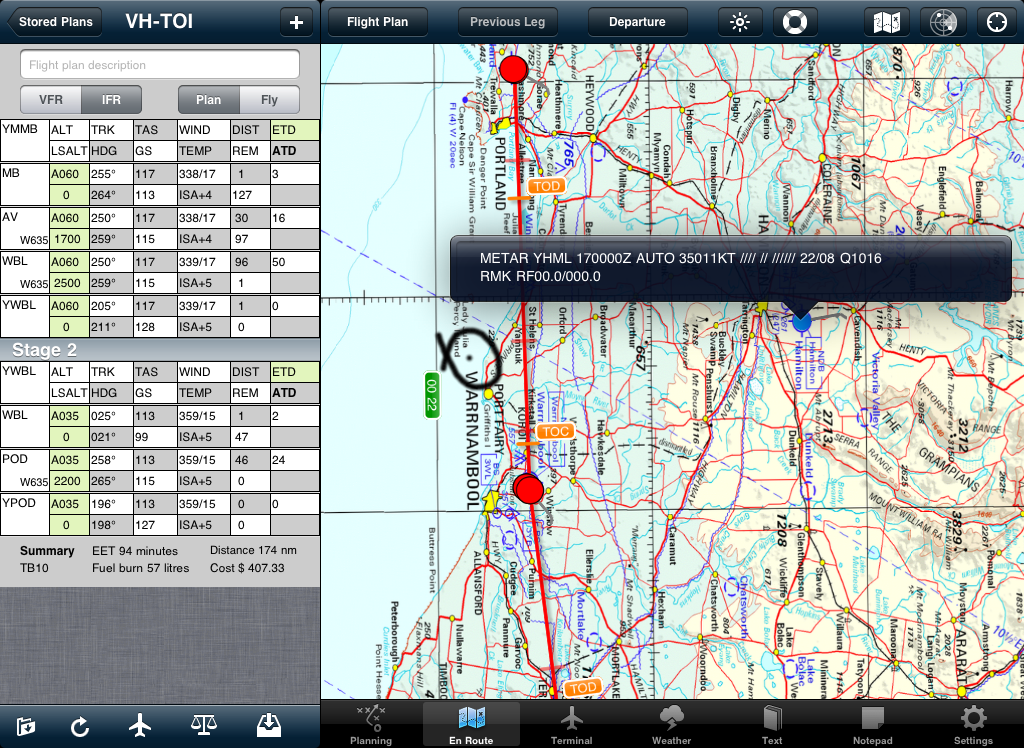
AvPlan 1.5.3 is now available via the Apple App Store. This release includes a bunch of new features; Added Sunrise/Sunset […]
Learn More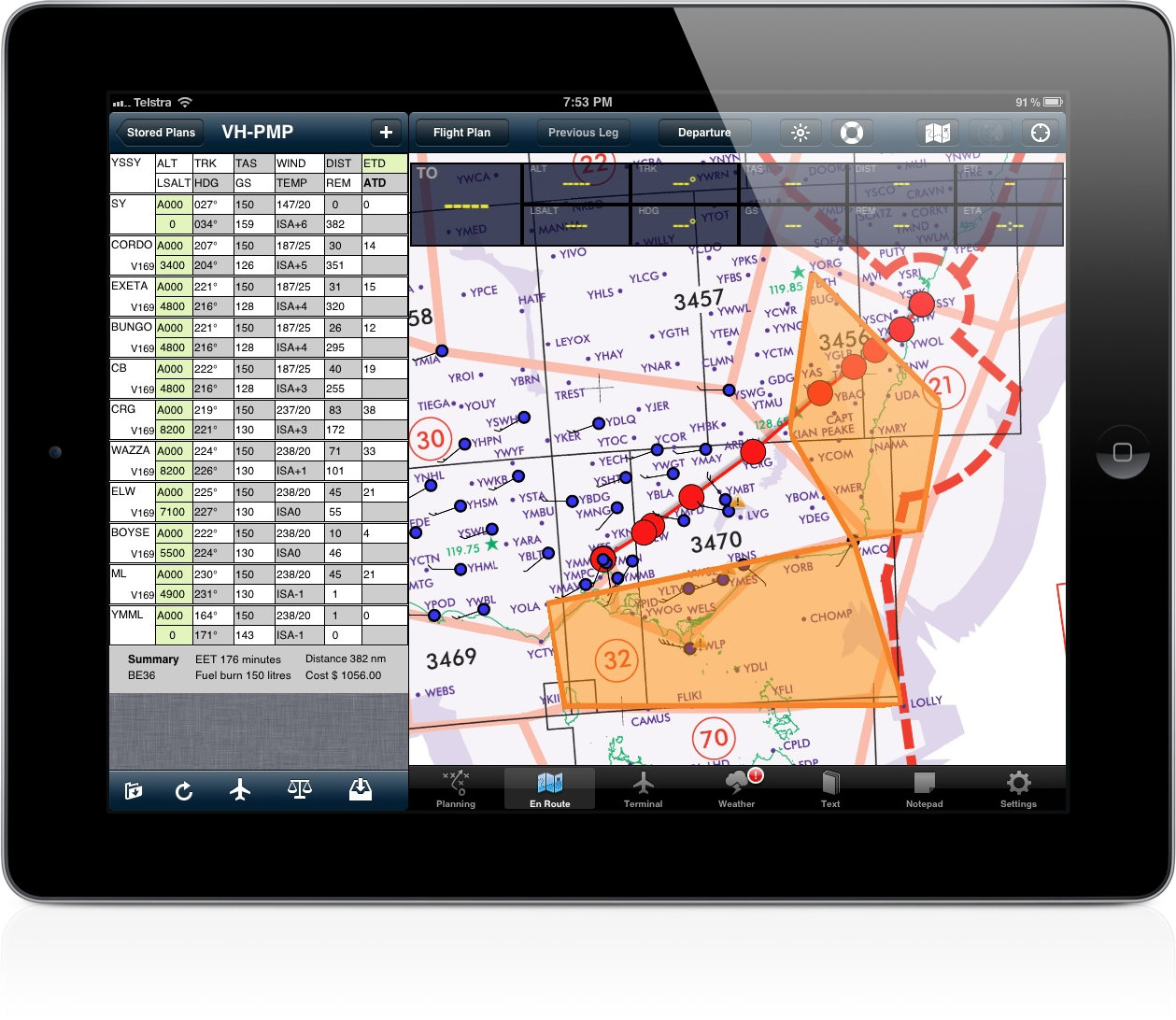
AvPlan 1.5.1 is now available in the App Store. In this release we have added SIGMET and METAR overlays over […]
Learn More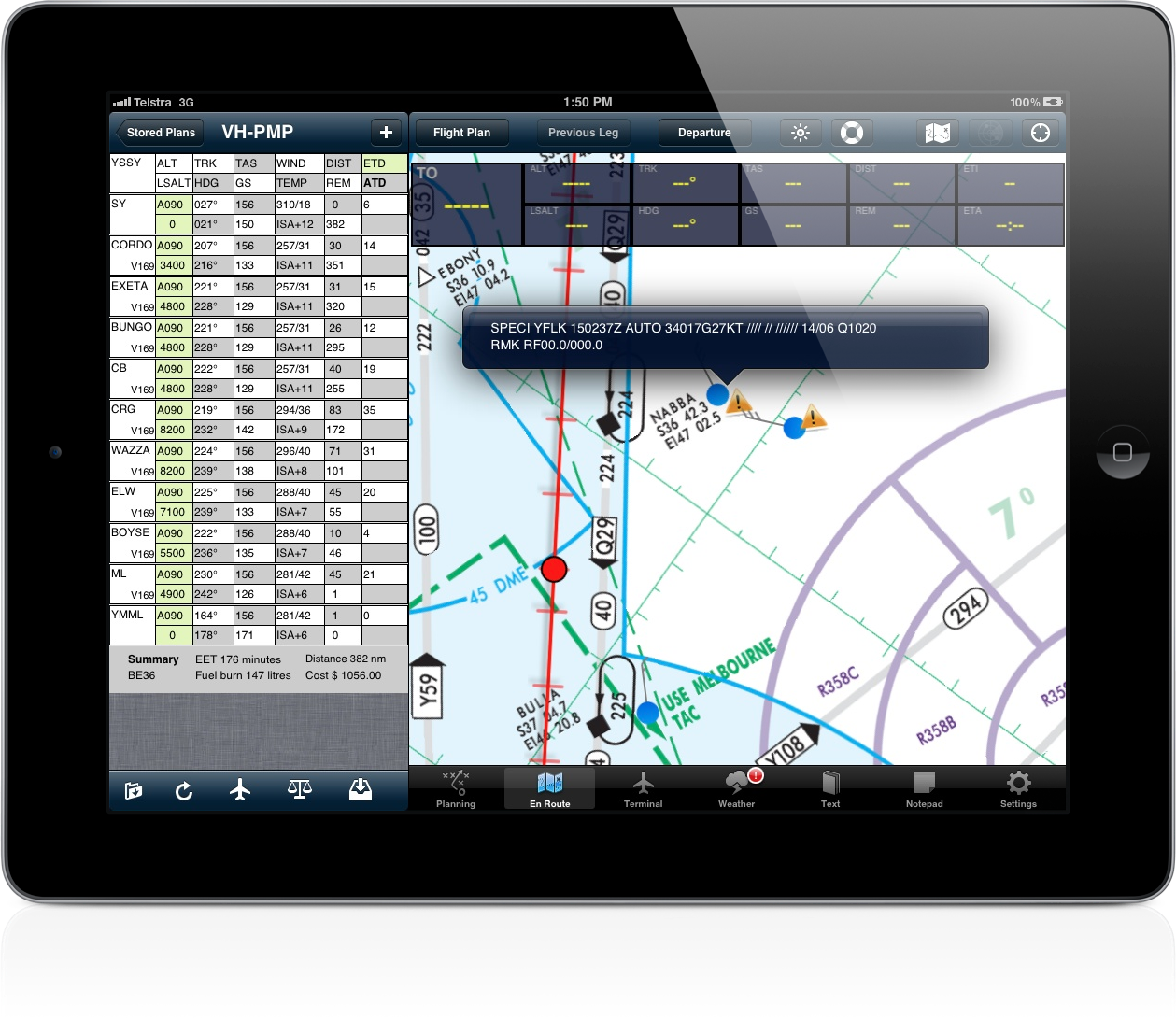
To assist with situation awareness we have added two new map overlays in the upcoming 1.5.2 release; The METAR overlays […]
Learn More
AvPlan 1.5.1 has been approved and is now available via the Apple App Store. AvPlan1.5.1 adds the following new features […]
Learn More
The finishing touches are going on the November 2011 data update which is valid from 17 November. Expect to see […]
Learn More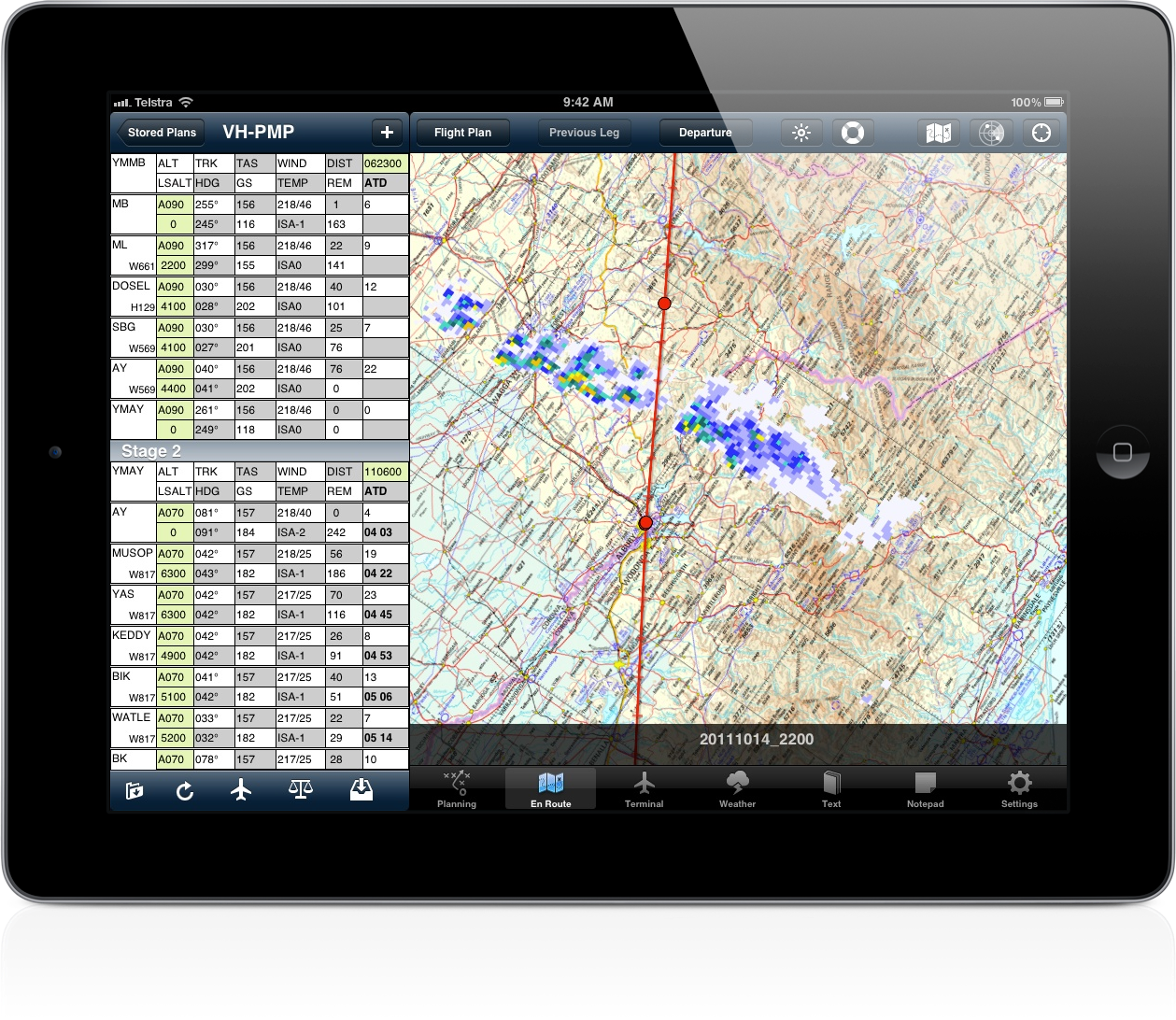
Apple have reviewed the latest AvPlan update (1.5) in less than 12 hours, and it is now available via the […]
Learn More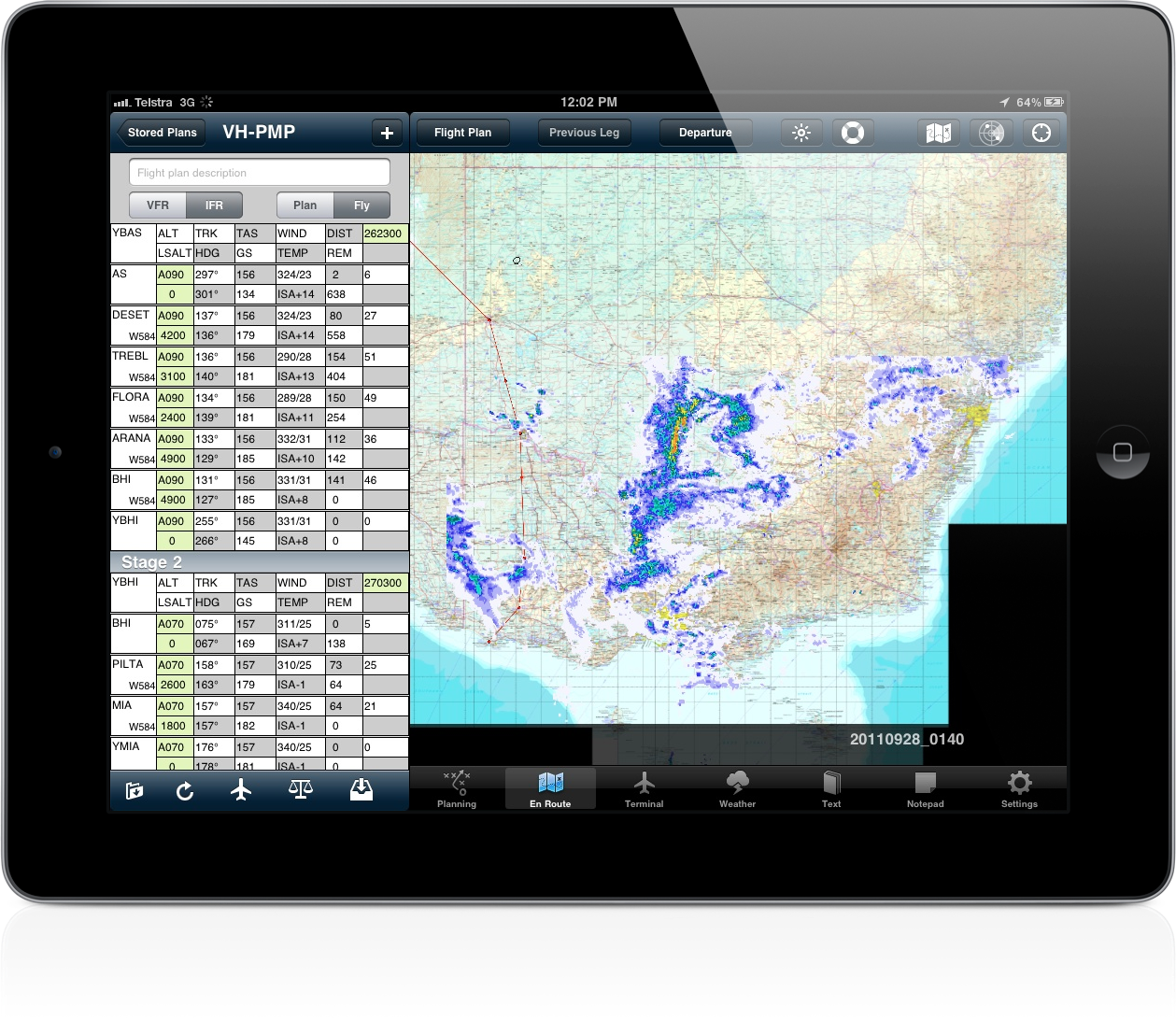
AvPlan 1.4.1 has been released and is now available in the Apple App Store. In this release we have added […]
Learn More AvPlan 1.4 has been approved and is now available in the Apple App Store. This release adds a few features […]
Learn More Appearing in an AvPlan update shortly will be new Mega-Maps. These are a mosiac of AirServices charts showing an entire […]
Learn More
Hi ! We have put a lot of effort into improving the stability of AvPlan and want to make it […]
Learn MoreAvPlan 2.0 can show your position on airport diagrams and approach plates. You can individually enable and disable the Aircraft […]
AvPlan 2.0 introduces a major new first for an Australian made EFB – geo-referenced airport taxi diagrams which show your […]
If you like the app, please rate it in the app store.
Today AvPlan turns 1! A year ago we launched AvPlan and it has proved far more popular than we ever […]
After much debate with Apple, we are extremely excited to announce that AvPlan 2.0 is now available in the App […]
The current legal situation with using AvPlan as an EFB in flight is somewhat unclear. CAR 233 specifies that the […]
When adding an aircraft, the various avionics may be specified by tapping on ‘Avionics’. If you require to use ‘Z […]
At AvPlan we intend to support as many devices and operating system versions as possible, however we must be sensible […]
To add a flight plan leg to an alternate aerodrome, tap the ‘+’ at the top of the flight plan. […]
Well we have been sitting in the queue at Apple now for over 11 days now. Usually our updates get […]
AvPlan automatically saves all downloaded weather information – it does this unobtrusively in the background as and when required. When […]
Weather is constantly changing, and as a pilot a complete understanding of changing conditions is extremely important. That is why […]
The red (!) on the icon for the Weather pane indicates there is a SIGMET in the current forecast. […]
AvPlan 2.0 has a nifty feature built in that detects when you land, then automatically switches the terminal pane to […]
With the release of AvPlan 2.0 we will be streamlining the subscription model. Almost all the current subscribers at least […]
AvPlan 2.0 draws all routes as correct great circle tracks. The previous method worked for legs which were relatively short, […]
We have given the weight and balance screen an overhaul in AvPlan 2.0. We have Added grid lines on the […]
AvPlan includes the ability to add a fix to a map, just like drawing a circle around your current position […]
AvPlan 2.0 adds AIP SUP pages to the list of available items under the Text pane. Support has also been […]
One method of adding a track point to your plan is tapping the ‘+’ at the top right hand side […]
AvPlan 2.0 includes a built-in terrain warning system. These alerts are based on the FAA TAWS-B standard, and when triggered, […]
AvPlan 2.0 incorporates a unique ability to find the shortest IFR route between any two points in its database if […]
AvPlan 2.0 includes the ability to double tap on a map to view the status of a restricted area. The […]
The June data update, which is valid from 28 June 2012 is now available for download. The app will prompt […]
AvPlan 2.0 includes a completely revamped weather overlay system. The BOM radar can be overlaid all map types (not just […]
In some cases it can be necessary to delete a single ERSA or DAP page and have it re-download (if […]
When a flight plan has been submitted using NOSEND, and then the same plan needs to be sent with a […]
We are happy to announce that AvPlan 1.7.3 is now available in the App Store. In this release we have […]
We have put a lot of effort to allow you to import existing flight plans into, and export flight plans […]
Moving map mode is enabled at any time when no flight plan is active. Tapping the map will bring up […]
At times you will notice the stored plans have different colours Black – all is in sync Blue – currently […]
If you like the app, when a new update appears in the App Store, go and rate the new version. […]
To extend your battery life when flight planning, disable the moving map (which will turn off the GPS). Tap ‘Settings’, […]
In moving map mode, tapping the data labels that overlay the map will cancel direct-to navigation.
We will be presenting AvPlan to the Southport Flying Club on Saturday 12th of May 2012 at 10am. We will […]
AvPlan 1.7.1 is now available in the App Store. This release mainly features bug fixes to improve performance and stability.
An old stored flight plan can be deleted by swiping the row. Tap the delete button which appears and the […]
An active SARTIME can be cancelled directly by AvPlan. Firstly, submit a flight plan or SARTIME notification with AvPlan. At […]
To enable track up mode on the map, tap the map settings button and tap ‘Map Rotation’. With ‘track up’ […]
AvPlan 1.7 is now available in the App Store. In this release we have added the following new features; SARTIME […]
AvSoft Cloud Services enable flight plans and aircraft details to be backed up and synchronised automatically across your various devices. […]
AvPlan includes a terrain database which covers all of Australia at a resolution of approximately 1km square. A view of […]
Since version 1.6.1, AvPlan has included an interface to enable it to connect to X-Plane. Tap ‘Settings’, ‘User Settings’ and […]
Full text search is available for all documents in the ‘Text’ pane in the app. To search for a term; […]
AvPlan can email complete aircraft models, which can be imported by other users on their devices. Tap ‘Settings’, ‘Aircraft Type […]
AvPlan now includes the ability to search for a location. Tap the En Route pane to go to a map, […]
AvPlan 1.6.2 is now available from the App Store. This release adds; Users can exchange aircraft models via email. Maps […]
The table of contents for the AIP is available in AvPlan 1.6.1. Tap ‘Text’ and open a section of the […]
After a long wait, and a bit of debate with the folks in App Review, we are pleased to announce […]
To load the AvPlan user manual into iBooks, on your iPad/iPhone, open Safari and open the user manual located at […]
We’re working on yet more innovative ways to display weather information to assist with preflight planning and inflight situation awareness. […]
The aircraft icon changes colour depending on the state of the GPS signal; Black when location information is unavailable, or […]
To delete an unwanted performance profile, tap the aircraft icon under the flight plan, and then the aircraft. Swipe the […]
By default, AvPlan will use the last aircraft and flight rules used to create a new flight plan.
AvPlan will interpret and display current SIGMET’s as large orange areas on the map. To enable the SIGMET display, on […]
Additional fields in a NAIPS plan submission can be entered as follows; DLA/ – tap on the desired leg of […]
With ‘Centre on location’ set on the map, you will find you cannot scroll around (zooming will still work). To […]
To download an aircraft model from the type database, Go to Settings, Aircraft Type Database in the app on your […]
Your iPad and iPhone will shut down if they get too hot. To ensure that your device remains available, do […]
If you enter an email address and password into AvPlan (Tap Settings, User Details), the app will automatically backup your […]
To print or send a blank plan form, tap ‘Planning’ and then ‘Print/Send’. With only ‘blank plan’ selected a blank […]
On the En Route tab, the course prediction line shows the anticipated location in 2, 5 and 10 minutes based […]
AvPlan can show you your current leg information shown as data fields over the En Route pane. Tap the ‘Map […]
A user lowest safe altitude can be entered for any leg in a flight plan. After calculating the correct altitude, […]
When you tap the radar button on the En Route tab, the radar overlay is activated. A text bar appears […]
These days there are many IACO approved type designators – but occasionally you may need to submit a plan for […]
Coming soon to AvPlan will be a terrain overlay on all Airservices maps. This overlay will show areas of terrain […]
To quickly locate ERSA information for a point on the map, tap the map on/near the point to bring up […]
When away from internet access, it may be necessary to manually add winds to a plan. Do do this place […]
By default, AvPlan saves all forecasts – to delete forecasts older than 7 days, go to the weather pane, tap […]
AvPlan users have the option to disable automatic weather downloads as a flight plan is created. Open the ‘Settings’ app, […]
Tap (and hold if in fly mode) on the En Route page will bring up the ‘Select Nearest’ window. The […]
The red exclamation mark on the Weather tab indicates a SIGMET is active in the current forecast. This can be […]
To access an approach plate for a leg in your flight plan, tap on the row of the plan. The […]
To copy an aircraft type, tap ‘Settings’ then ‘Aircraft Type Database’. Tap ‘Edit’ and select the aircraft type to be […]
To track direct to a leg in your current plan, tap and hold on that leg in the flight plan. […]
At times of bad network connectivity, downloading weather forecasts can be slow. To cancel a weather forecast download in progress, […]
To clear all details from a flight plan so it can be reused, tap the edit button on the bottom […]
To resume tracking via your flight plan after flying in ‘Direct To’ mode, tap and hold on the appropriate leg […]
To track direct to a point which is not in your plan, tap and hold the map near the location […]
AvPlan will overlay METAR’s on the maps and colour code them depending on the actual conditions. Tap the map […]
When flying at night, fully dim the iPad using the iPads brightness control and then further adjust it with the […]
To move a flight plan leg, tap and hold on the waypoint on the map until the blue ring appears […]
To quickly delete a flight plan leg, tap and hold on a the leg to be deleted. From the menu […]
Often it is necessary to insert a point on a map into a leg of a plan. For example, to […]
We are extremely excited to announce that AvPlan 1.6 is now available. This is the first version to support the […]
Welcome to the AvPlan tip of the day! Check back here each day, or subscribe to our tips via email […]
We hope you all had a very merry Christmas and have a happy and successful 2012. We have been busy […]
AvPlan 1.5.4 is now available via the Apple App Store. This release includes the following new features; Direct to navigation […]
Hi Folks We are slowing down as the holiday season approaches, and putting the final touches on what will be […]
AvPlan 1.5.3 is now available via the Apple App Store. This release includes a bunch of new features; Added Sunrise/Sunset […]
AvPlan 1.5.1 is now available in the App Store. In this release we have added SIGMET and METAR overlays over […]
To assist with situation awareness we have added two new map overlays in the upcoming 1.5.2 release; The METAR overlays […]
AvPlan 1.5.1 has been approved and is now available via the Apple App Store. AvPlan1.5.1 adds the following new features […]
The finishing touches are going on the November 2011 data update which is valid from 17 November. Expect to see […]
Apple have reviewed the latest AvPlan update (1.5) in less than 12 hours, and it is now available via the […]
AvPlan 1.4.1 has been released and is now available in the Apple App Store. In this release we have added […]
AvPlan 1.4 has been approved and is now available in the Apple App Store. This release adds a few features […]
Appearing in an AvPlan update shortly will be new Mega-Maps. These are a mosiac of AirServices charts showing an entire […]
Hi ! We have put a lot of effort into improving the stability of AvPlan and want to make it […]