



 AvPlan
 iOS 27: please continue to hold off upgrading
We continue to advise AvPlan EFB users to delay upgrading to iOS 27, as some devices may experience GPS issues after the upgrade.
Learn More



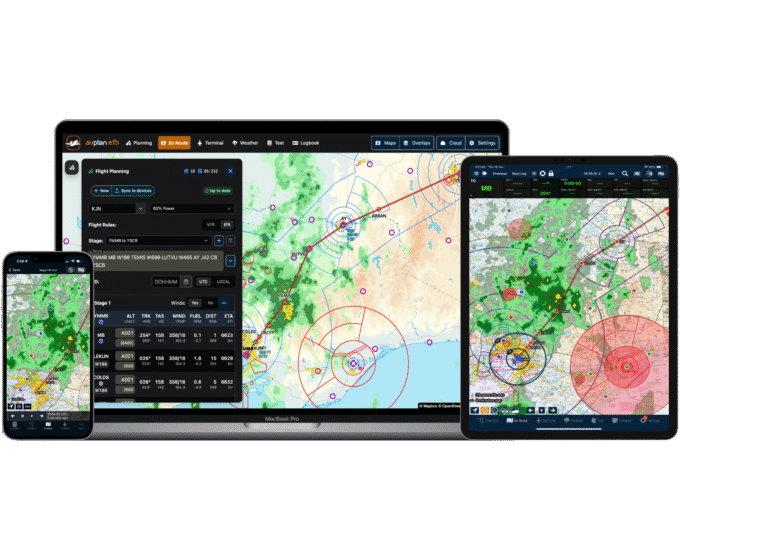
AvPlan EFB 10.0 is one of our largest updates yet, with major improvements across flight planning, weight and balance, weather, terminal information, documents, reporting and reliability.
This release focuses on making the whole planning workflow more connected: from building a trip, loading the aircraft, checking fuel and alternates, reviewing weather, briefing from documents, and carrying that information through to flight logs and reports. Integration with AvPlan Web has also been tightened up into a single platform for flight planning.
AvPlan EFB 10.0 introduces ActivePlates, an innovative way to display your position on the vertical profile on selected approach plates. Additionally the current MSA sector is highlighted and the inbound course on the holding patterns for the approach is displayed with a magenta arrow. Passing 2nm from the missed approach point inbound, the missed approach details will also highlight on the plate.
ActivePlates also includes a HUD on your approach plate. The current ground speed, required vertical speed for the approach glideslope, required altitude at the present position to be on profile for the approach and the surface wind is displayed.
ActivePlates is now available for RNP approaches in Australia and many RNP approaches in New Zealand are also available now.
Weight and balance has received a major upgrade. Version 10.0 adds advanced W&B support, improved load-station handling, better fuel tank behaviour, required fuel loading, load limit warnings, CG and fuel warnings, optional equipment fill-forward, and improved iPhone layouts. Required fuel, max fuel, ground running, loiter fuel and refuel workflows have all been tightened up. Lastly there is an auto-load feature to place X weight of passengers in Y number of seats. Enterprise users can opt into the new loading system by tapping Settings, User Settings, Advanced Loading (Enterprise administrators can enable this for all users in the Enterprise Cloud settings). All other users will see the new loading system by default.
AvPlan EFB 10.0 introduces an improved trip workflow, with better trip persistence, offline handling, syncing, automatic trip population, and a refreshed trip editor. Trips now carry more of the planning context with them, including aircraft state, load information, fuel uplift details, and improved handling for multi-stage planning. Enterprise customers can upload documents both pre-flight and post-flight into the AvPlan Enterprise Cloud and the new Tech Log feature will link these documents to the plan, flight log, NAIPS submission and flight times. These are then available to view in the AvPlan Enterprise Cloud portal on https://live.avplan-efb.com .
The Terminal page has been expanded with ActivePlates, runway views, runway circuit direction information, plate annotations on map overlays, favourite plate controls, and direct access to weather from plates. Airport details also load faster.
Weather and briefing tools have been improved with a new GAF display, critical locations and labels, freezing level fixes, better NZ wind handling, and SPFIB briefing search, highlighting and layout improvements
Synthetic Vision has been updated, and the HUD now includes a G meter. Flight logs now include extra operational context such as G load, network state, day/night information and turbulence.
Documents and reports have also been improved. Flight plans can now be annotated while planning, PDF search has been improved, document table-of-contents handling is smarter, and reports include refinements for fuel planning.
AvPlan EFB v10 also includes the following smaller fixes and improvements;
– Added required fuel prompts for multi-stage plans.
– Added fuel tank shading and warnings when fuel is below required levels.
– Added SPFIB briefing search and highlighting.
– Added aircraft creation wizard.
– Added ability to draw on plan reports.
– Fixed alternate stages being removed when editing a route via Quick Edit or the Route button.
– Fixed multi-stage load loading issues.
– Fixed step climb time and fuel totals.
– Fixed route selection when alternates are present.
– Fixed altitude optimiser alternate-leg shading and added clearer altitude optimiser output.
– Improved plan activation on departure.
– Fixed recently filed routes.
– Fixed remarks entry.
– Fixed long remark submission to IFIS.
– Fixed user waypoint issues, including NZTM support and edit-map behaviour.
– Fixed loading of KMZ files with local images.
– Fixed corrupt downloaded winds causing repeated download loops.
– Fixed old TAF/METAR display issues and TAF date handling.
– Fixed NZ wind refresh and magnetic variation handling.
– Fixed international radar display.
– Improved PDF search and ERSA link viewing.
– Fixed group documents displaying filenames instead of names.
– Improved group aircraft and pilot profile syncing.
– Fixed cases where an aircraft might not be active when creating or opening a plan.
– Fixed flight profile view issues.
– Improved departure handling in track logs.
– Improved logging, diagnostics, performance and stability throughout the app.
AvPlan We continue to advise AvPlan EFB users to delay upgrading to iOS 27, as some devices may experience GPS issues after the upgrade.
Learn More AvPlan Discover the improvements in AvPlan EFB 10.1.1, including advanced loading, flight-plan sync, load-sheet sharing and NOTAM notes.
Learn More AvPlan Discover what’s new in AvPlan EFB 10.1, including Journey Logs, expanded weight and balance, route simulation, weather improvements and reliability fixes.
Learn More