


AvPlan EFB - Electronic Flight Bag Logo AvPlan EFB - Electronic Flight Bag Alternate Logo AVPlan Logo
    Select Currency
  • Flag AUD
    Australian dollar
    • Flag AUD
      Australian dollar
    • Flag USD
      United States (US) dollar
    • Flag EUR
      Euro
    • Flag GBP
      Pound sterling
    • Flag NZD
      New Zealand dollar
  • Cart
  • Login
  • TRY FOR FREE
  • Features
  • Solutions
    • Private Aviation
    • Business Aviation Solutions
    • SAR/EMS
    • Military Aviation
  • Subscriptions
    • Australian Subscriptions
    • New Zealand Subscriptions
    • US Subscriptions
    • European Subscriptions
    • Middle East Subscriptions
    • Worldwide Subscriptions
    • AvPlan Enterprise
  • Other Products
    • AvPlan OMNI
    • Aviation Data for Dynon SkyView
    • Command Flight Planner
    • Are you ok2fly?
    • Compatible Hardware
  • Learn
    • User Manuals
    • Webinars
    • Video Tutorials
    • Blog
    • Frequently Asked Questions
  • Contact
  • AvPlan Web
  • Login
  • TRY FOR FREE
  • Cart
  • Flag AUD
    Australian dollar
    • Flag AUD
      Australian dollar
    • Flag USD
      United States (US) dollar
    • Flag EUR
      Euro
    • Flag GBP
      Pound sterling
    • Flag NZD
      New Zealand dollar
  • Home
  • Blog
  • AvPlan EFB 10.1: What’s New
AvPlan

AvPlan EFB 10.1: What’s New

AvPlan EFB 10.1 brings new tools for planning, loading and recording your flights, alongside improvements to weather displays, aircraft sharing and everyday reliability. Highlights include signed Journey Logs for Operations customers, expanded lateral weight-and-balance support and a new option to simulate your active flight plan. AvPlan EFB 10.1 supports iOS 27, and users should upgrade to this release when upgrading their devices to iOS 27.

Flight planning and navigation

  • Compare a selection of suggested shortest routes when planning your flight, with improved ERSA stored-route selection and loading.
  • Use Follow Active Plan in the built-in simulator to follow your planned route, including Direct To changes.
  • Runway details now show magnetic headings for each runway end.
  • The terminal chart’s Altitude Required indication is now limited to within 25 NM of the chart reference point.
  • Fixed an issue where selecting Direct To could record an arrival time for a waypoint you had not reached.
  • Reversing a flight plan now clears the previous SARTIME arrival point.
  • Improved map redraw reliability. Distance rings remain available after restarting the app and during navigation-data updates.

Weather and briefings

  • Choose VFR Light or VFR Dark maps in Graphical Area Forecasts and zoom directly to your flight plan. GAF validity times now show both UTC and local time.
  • Select or deselect multiple weather overlays without reopening the selection menu.
  • Improved NAIPS account verification, with automatic renewal of expiring passwords for individually managed accounts.
  • SPFIB briefings now include the complete route, alternate route and altitude, and aircraft wake category.
  • Added a warning when a saved SPFIB briefing is more than five days old or its age cannot be verified.
  • Improved METAR widget refresh reliability and made wind-speed formatting more consistent across weather displays.

Aircraft, loading and weight and balance

  • Added lateral envelope options for lateral arm versus weight and lateral arm versus longitudinal arm, with improved editing, loading checks and printed reports.
  • Added an aircraft setting to display the right side as negative, with matching lateral graphs and seat-map orientation.
  • Added an infant standard-weight preset and improved the layout of standard-weight buttons on smaller screens and at larger text sizes.
  • Approved weight-and-balance updates preserve your local profile names and optional equipment.
  • Improved shared-aircraft synchronisation, including fixes for disappearing empty-weight and arm values, and added a manual Sync Group Aircraft action.
  • Fixed an issue where multiple unnamed passengers could be combined into a single manifest entry.
  • Corrected handling of negative values when updating loading stations.

Journey Logs and Operations

Enterprise Operations customers can prepare Journey Logs with flight times, crew, fuel and observations, then have the pilot in command sign a PDF. Signed entries can be amended and signed again.

  • Journey Log details are retained when saving the Tech Log, with improved handling of uploads queued while offline.
  • Improved presentation of the Journey Log signature form.
  • Shared operational trips import each stage’s route, passenger details and cargo loads, including trips starting or ending at user waypoints.
  • Copying or clearing a flight plan removes its link to the previous operational trip.

Sharing and integrations

  • Stage-specific flight-plan remarks retain your edits when reopened, copied or shared through GPX. Changing aircraft or pilot details updates the relevant remarks without repeatedly adding the same text.
  • Added HAAST flight-intention support for accounts with HAAST access.
  • Fixed Garmin flight-plan exports for Australian intersections and improved handling of special characters in GPX exports and flight-plan imports.
  • Fixed an issue where editing a pilot profile could lose its goPreFlight credentials.

Printing and reliability

  • Improved PDF printing and export, including page sizing, rotation, and layouts with one or two pages per sheet.
  • Exported PDF filenames now identify the document type, making navlogs, loadsheets, briefings and charts easier to recognise.
  • Corrected actual fuel values on printed departure rows.
  • Improved retention of user charts during cache cleanup.

Thank you for your feedback and continued support of AvPlan EFB.

Related Articles

AvPlan

AvPlan Web: What’s New Since Launch

Discover what’s new in AvPlan Web since its July launch, including new route options, New Zealand weather, aircraft imports, flight paperwork and tools for operators.

Learn More


AvPlan

Data Update 2609

Effective 3 September 2026 What is changing? The Australian DAP 2609 update includes revised approach plates at 35 airports. Most […]

Learn More
AvPlan

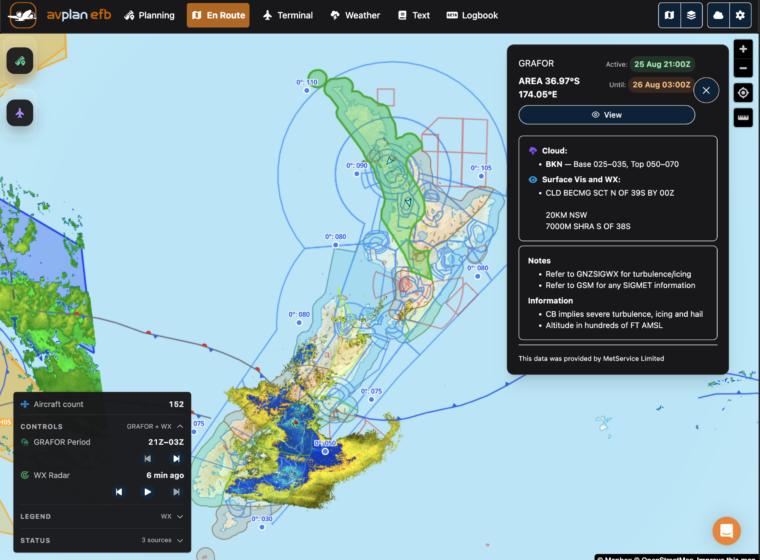
Preflight Aviation Weather In AvPlan Web

Planning flights across New Zealand just became easier. AvPlan Web now provides access to all the aviation meteorological data available […]

Learn More

Try AvPlan EFB for free

Download the app now to start your free 30 day trial

Or view our plans starting at $169/yr

Features

Solutions

  • Private Aviation
  • Business Aviation Solutions
  • SAR/EMS
  • Military Aviation

Subscriptions

  • Australian Subscriptions
  • New Zealand Subscriptions
  • US Subscriptions
  • European Subscriptions
  • Middle East Subscriptions
  • Worldwide Subscriptions
  • Digital Charting
  • ADSB Devices

Resources

  • Tips
  • Frequently Asked Questions
  • Learn
  • User Manuals
  • Video Tutorials

About

  • About AvSoft
  • Blog
  • Events
  • Media
  • Community
  • Contact
  • AvPlan Cloud Login
  • AvPlan Live Login

Electronic Flight Bag

Subscribe for updates

This field is for validation purposes and should be left unchanged.

Features

Solutions

  • Private Aviation
  • Business Aviation Solutions
  • SAR/EMS
  • Military Aviation

Subscriptions

  • Australian Subscriptions
  • New Zealand Subscriptions
  • US Subscriptions
  • European Subscriptions
  • Middle East Subscriptions
  • Worldwide Subscriptions
  • Digital Charting
  • ADSB Devices

Resources

  • Tips
  • Frequently Asked Questions
  • Learn
  • User Manuals
  • Video Tutorials

About

  • About AvSoft
  • Blog
  • Events
  • Media
  • Community
  • Contact
  • AvPlan Cloud Login
  • AvPlan Live Login
© 2026 AvSoft Australia Pty Ltd.
  • Privacy Policy
  • Terms of Use